Claude MCP Integration • AI Email Copilot

mails.now + Claude

Connect mails.now to Claude via MCP. Trigger high-converting outbound sequences and verify inbox placement directly from Claude Desktop, Claude Code, or claude.ai.

MCP Spec v1.0 Compliant • 80 tools available
claude.ai — mails.now connected
Claude
Connected to mails.now · 80 tools available · ask in plain English
Verify SPF, DKIM, and DMARC on outreach.example.com, then list mailboxes ready to send
Tool calls stream inline in this chat
QUICK SETUP

Connect in 30 seconds

Follow one of below setup, based on what client tool you use.

*Important: After connecting, complete OAuth when Claude prompts you.

  • Complete domains DNS, campaign and lead management with plain English
  • SPF, DKIM, and DMARC checks in chat
  • OAuth only — no API keys in config
Terminal — Claude Code
$
claude mcp add --transport http mails-now https://mails.now/mcp/mailapi
✓ Added MCP server mails-now
✓ Transport: HTTP
Complete OAuth when Claude Code prompts you.
Claude Code CLI (v1.0.0) Shell
claude_desktop_config.json
{
  "mcpServers": {
    "mails-now": {
      "url": "https://mails.now/mcp/mailapi"
    }
  }
}
MCP Server Status: Operational (v1.0.0) JSON • UTF-8
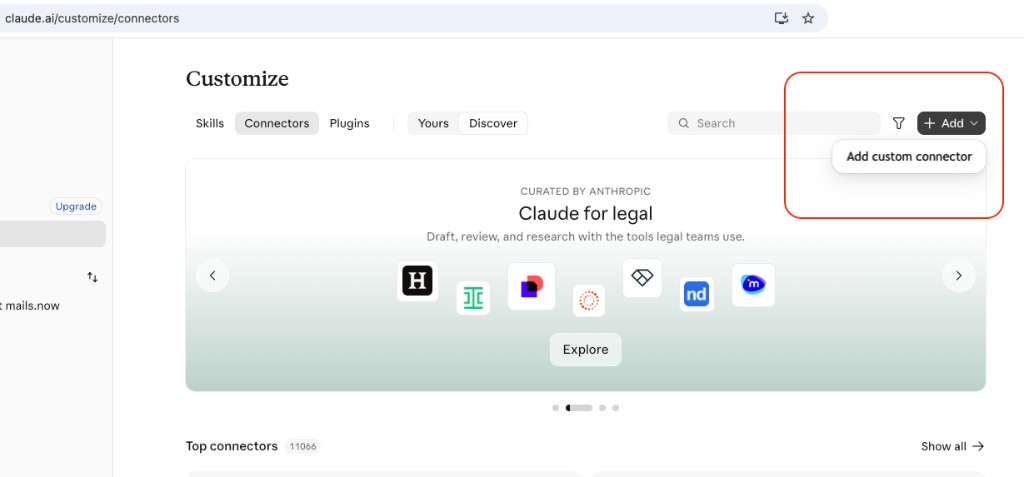
claude.ai/customize/connectors
claude.ai Customize → Connectors with Add custom connector highlighted
No coding

Describe what you want.
In English.

Describe what you want. Claude handles domain checks, mailbox provisioning, and sequencer actions for you.

“list every domain in this workspace, then verify SPF, DKIM, and DMARC on the ones that are not fully authenticated”

DNS verification
inspect domains, then validate auth records

“create fifty mailboxes on outreach.example.com using first.last patterns and poll until provisioning finishes”

Mailbox provisioning
bulk create, then poll get_task_status

“enroll these leads into the SaaS onboarding sequence and pause any campaign with a bounce rate above two percent”

Sequencer control
enroll, pause, and inspect campaign health

Want Claude to get this right every time — every DNS check, every mailbox pattern, counts before spend? Hand it the getting-started playbook.

Available Tools

80 tools. Search, enrich and act.

All tools are available through natural language. Claude picks the right tool automatically — no parameters, no documentation required. Here are the tools you'll reach for most:

Claude Desktop & Claude Code Ready
All 80 tools accessible via natural language
Domains & DNS 15 tools
Mailboxes 10 tools
Sequencer 23 tools
Leads & Inbox 32 tools
Simple process

In 3 simple steps

1. Instant OAuth Link

Claude authenticates directly with your workspace credentials. Your API tokens stay secure and refresh automatically without manual key rotation.

2. Ask Claude anything

“List domains that still need DKIM”, “Create twenty mailboxes on this subdomain”, or “Pause campaign camp_123”. Claude calls mails.now tools inline.

3. Inspect & Dispatch

Review tool results directly in chat. Validate DNS, poll provisioning tasks, and enroll sequencer campaigns from Claude without context switching.

FAQ

mails.now + Claude integration FAQ

Everything you need to know about running mails.now within Claude via Model Context Protocol.

Which Claude products support mails.now MCP?
claude.ai (Custom connectors), Claude Desktop, and Claude Code all work with the hosted Streamable HTTP endpoint. Add https://mails.now/mcp/mailapi (or run the Claude Code CLI), then complete OAuth when prompted.
What is the fastest way to connect Claude Code?
Run claude mcp add --transport http mails-now https://mails.now/mcp/mailapi in your terminal. Claude Code registers the remote HTTP transport for you—no JSON editing. Start a new Claude Code session (or reload MCP), enable mails.now, and finish browser OAuth.
How do I connect claude.ai?
In claude.ai, open Customize → Connectors, add a custom connector with https://mails.now/mcp/mailapi, then complete the OAuth consent in the browser. Tools show up in that chat after authorization—no local config file required.
Which email marketing tools are available via MCP?
You have full programmatic access to: domain and mailbox provisioning, DNS verification (SPF/DKIM/DMARC), sequencer campaigns and sequences, lead lists/tags/notes, transactional sends, inbox listing, and webhook registration.
Does this use the same credits as the dashboard?
Yes. Claude authenticates through your primary mails.now account. Provisioning, sequencer actions, and sends draw directly from your unified plan entitlements with zero markups or separate licensing fees.
Do I need a separate API key for Claude?
No. Hosted MCP uses OAuth sign-in. You never need to paste raw API keys into Claude Desktop, Claude Code, or claude.ai connector settings.
If you're ready to manage campaigns from your desktop,

Add the remote MCP server, complete OAuth sign-in, and Claude can use live mails.now campaign and deliverability tools immediately.

Jump to setup
Claude Desktop & Code Live
View all MCP tools