
Email infrastructure
built to send at scale
Provision mailboxes, run outbound sequences, and send transactional email from one platform your team can actually run.
Trusted by startups, GTM teams, and agencies scaling outbound





Infrastructure, sequencer, and
analytics in one place
Provision mailboxes, run multi-sender campaigns, organize leads, and automate everything with a full REST API.
Mailbox & domain API
Provision domains, verify DNS, and create single or bulk mailboxes from one dashboard or API. Every inbox is sequencer-ready from day one.
Email sequencer with multi-sender
Build multi-step sequences, rotate across sender mailboxes, and control daily limits, ramp-up, and sending windows — all from your provisioned inboxes.
*Use in compliance with provider terms. Check our TOS.
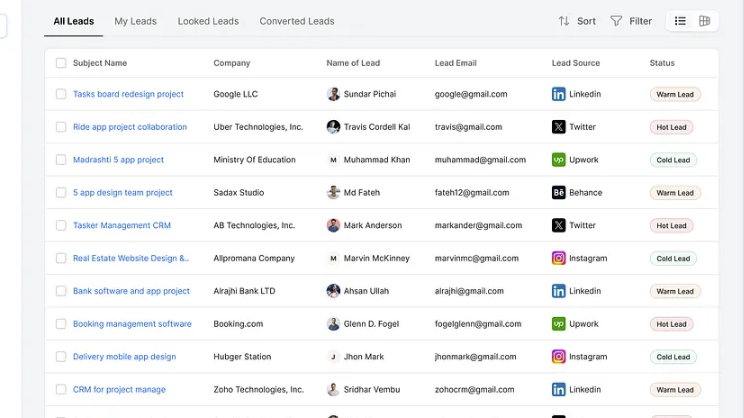
Leads, lists & tags
Import leads via CSV, organize with static lists and colored tags, and enroll entire audiences into campaigns with one click.
Start free trial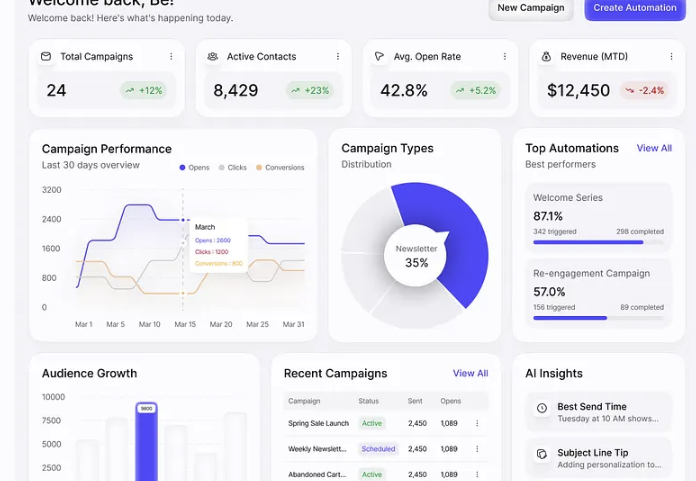
Analytics & full API
Track opens, clicks, replies, and bounces by mailbox, step, and domain. Automate everything with REST endpoints, webhooks, and MCP tools — including transactional email on the same infrastructure.
Explore API docs
From signup to first send
in four steps
Create your account
Sign up, choose a plan, and you’re in. Paid plans include a 7-day trial so you can test before you commit.
- Fast signup
- Clear plan limits from day one
Connect your domain
Add your domain, follow the DNS steps we show you, and verify. Once it’s live, you’re ready to create mailboxes.
- Simple guided setup
- Support for subdomains on eligible plans
Create your mailboxes
Spin up the addresses you’ll send from. Use them for campaigns, product email, or day-to-day inbox work.
- Create one or many at once
- Ready to send as soon as DNS is verified
Send, track, and improve
Launch a sequence or send transactional mail. Watch what lands, what gets replies, and adjust limits as you scale.
- Campaigns + transactional sends
- Clear performance insights
Start sending in minutes
With API libraries for pretty much every programming language you can think of, Mails.Now fits seamlessly into any stack.
# Send an email with curl
# Copy and paste this into terminal
curl "https://mails.now/api/v1/transactional/send" \
  -X POST \
  -H "Accept: application/json" \
  -H "Content-Type: application/json" \
  -H "Authorization: Bearer YOUR_API_KEY" \
  -d '{
  "transactional_message_id": 1,
  "from": { "email": "sender@example.com" },
  "to": { "email": "receiver@example.com" },
  "variables": { "first_name": "Ada" }
}'
Credentials

Host: smtp-api.mailapi.tech
Port: 587 (recommended), 465
Username: mails.now
Password: <YOUR_API_KEY>
Auth PLAIN, LOGIN
Encryption TLS
# Send an email with wget

wget --method=POST \
  --header="Authorization: Bearer YOUR_API_KEY" \
  --header="Content-Type: application/json" \
  --body-data='{"transactional_message_id":1,"from":{"email":"sender@example.com"},"to":{"email":"receiver@example.com"},"variables":{"first_name":"Ada"}}' \
  "https://mails.now/api/v1/transactional/send"
// Send an email with Node.js

const response = await fetch("https://mails.now/api/v1/transactional/send", {
  method: "POST",
  headers: {
    "Authorization": "Bearer YOUR_API_KEY",
    "Content-Type": "application/json"
  },
  body: JSON.stringify({
    transactional_message_id: 1,
    from: { email: "sender@example.com" },
    to: { email: "receiver@example.com" },
    variables: { first_name: "Ada" },
  })
});
// Send an email from an Express.js route

const response = await fetch("https://mails.now/api/v1/transactional/send", {
  method: "POST",
  headers: {
    "Authorization": "Bearer YOUR_API_KEY",
    "Content-Type": "application/json"
  },
  body: JSON.stringify({
    transactional_message_id: 1,
    from: { email: "sender@example.com" },
    to: { email: "receiver@example.com" },
    variables: { first_name: "Ada" },
  })
});
// Send an email from a Next.js server action or route handler

const response = await fetch("https://mails.now/api/v1/transactional/send", {
  method: "POST",
  headers: {
    "Authorization": "Bearer YOUR_API_KEY",
    "Content-Type": "application/json"
  },
  body: JSON.stringify({
    transactional_message_id: 1,
    from: { email: "sender@example.com" },
    to: { email: "receiver@example.com" },
    variables: { first_name: "Ada" },
  })
});
// Send an email from a Nuxt server route or API handler

const response = await fetch("https://mails.now/api/v1/transactional/send", {
  method: "POST",
  headers: {
    "Authorization": "Bearer YOUR_API_KEY",
    "Content-Type": "application/json"
  },
  body: JSON.stringify({
    transactional_message_id: 1,
    from: { email: "sender@example.com" },
    to: { email: "receiver@example.com" },
    variables: { first_name: "Ada" },
  })
});
// Send an email with Bun

const response = await fetch("https://mails.now/api/v1/transactional/send", {
  method: "POST",
  headers: {
    "Authorization": "Bearer YOUR_API_KEY",
    "Content-Type": "application/json"
  },
  body: JSON.stringify({
    transactional_message_id: 1,
    from: { email: "sender@example.com" },
    to: { email: "receiver@example.com" },
    variables: { first_name: "Ada" },
  })
});
// Send an email from a Remix action

const response = await fetch("https://mails.now/api/v1/transactional/send", {
  method: "POST",
  headers: {
    "Authorization": "Bearer YOUR_API_KEY",
    "Content-Type": "application/json"
  },
  body: JSON.stringify({
    transactional_message_id: 1,
    from: { email: "sender@example.com" },
    to: { email: "receiver@example.com" },
    variables: { first_name: "Ada" },
  })
});
# Send an email with Python

import requests

response = requests.post(
  "https://mails.now/api/v1/transactional/send",
  headers={
    "Authorization": "Bearer YOUR_API_KEY",
    "Content-Type": "application/json",
  },
  json={
    "transactional_message_id": 1,
    "from": {"email": "sender@example.com"},
    "to": {"email": "receiver@example.com"},
    "variables": {"first_name": "Ada"},
  },
)
# Send an email with Rails

response = Faraday.post("https://mails.now/api/v1/transactional/send") do |req|
  req.headers["Authorization"] = "Bearer YOUR_API_KEY"
  req.headers["Content-Type"] = "application/json"
  req.body = {
    transactional_message_id: 1,
    from: { email: "sender@example.com" },
    to: { email: "receiver@example.com" },
    variables: { first_name: "Ada" },
  }.to_json
end
# Send an email with Ruby

require "net/http"
require "json"

uri = URI("https://mails.now/api/v1/transactional/send")
request = Net::HTTP::Post.new(uri)
request["Authorization"] = "Bearer YOUR_API_KEY"
request["Content-Type"] = "application/json"
request.body = {
  transactional_message_id: 1,
  from: { email: "sender@example.com" },
  to: { email: "receiver@example.com" },
  variables: { first_name: "Ada" },
}.to_json
// Send an email with PHP

$response = Http::withToken('YOUR_API_KEY')
  ->post('https://mails.now/api/v1/transactional/send', [
    'transactional_message_id' => 1,
    'from' => ['email' => 'sender@example.com'],
    'to' => ['email' => 'receiver@example.com'],
    'variables' => ['first_name' => 'Ada'],
  ]);
// Send an email with .NET

using var client = new HttpClient();
client.DefaultRequestHeaders.Add("Authorization", "Bearer YOUR_API_KEY");

var payload = new {
  transactional_message_id = 1,
  from = new { email = "sender@example.com" },
  to = new { email = "receiver@example.com" },
  variables = new { first_name = "Ada" },
};

await client.PostAsJsonAsync("https://mails.now/api/v1/transactional/send", payload);
// Send an email with Java

HttpClient client = HttpClient.newHttpClient();
String body = "{\"transactional_message_id\":1,\"from\":{\"email\":\"sender@example.com\"},\"to\":{\"email\":\"receiver@example.com\"},\"variables\":{\"first_name\":\"Ada\"}}";

HttpRequest request = HttpRequest.newBuilder()
  .uri(URI.create("https://mails.now/api/v1/transactional/send"))
  .header("Authorization", "Bearer YOUR_API_KEY")
  .header("Content-Type", "application/json")
  .POST(HttpRequest.BodyPublishers.ofString(body))
  .build();

HttpResponse<String> response = client.send(request, HttpResponse.BodyHandlers.ofString());
// Send an email with Go

payload := []byte`{"transactional_message_id":1,"from":{"email":"sender@example.com"},"to":{"email":"receiver@example.com"},"variables":{"first_name":"Ada"}}`)
req, _ := http.NewRequest("POST", "https://mails.now/api/v1/transactional/send", bytes.NewBuffer(payload))
req.Header.Set("Authorization", "Bearer YOUR_API_KEY")
req.Header.Set("Content-Type", "application/json")

resp, _ := http.DefaultClient.Do(req)
defer resp.Body.Close()
// Send an email from an AWS Lambda function

const response = await fetch("https://mails.now/api/v1/transactional/send", {
  method: "POST",
  headers: {
    "Authorization": "Bearer YOUR_API_KEY",
    "Content-Type": "application/json"
  },
  body: JSON.stringify({
    transactional_message_id: 1,
    from: { email: "sender@example.com" },
    to: { email: "receiver@example.com" },
    variables: { first_name: "Ada" },
  })
});
// Send an email from a Cloudflare Worker

const response = await fetch("https://mails.now/api/v1/transactional/send", {
  method: "POST",
  headers: {
    "Authorization": "Bearer YOUR_API_KEY",
    "Content-Type": "application/json"
  },
  body: JSON.stringify({
    transactional_message_id: 1,
    from: { email: "sender@example.com" },
    to: { email: "receiver@example.com" },
    variables: { first_name: "Ada" },
  })
});
// Send an email from a Vercel Function

const response = await fetch("https://mails.now/api/v1/transactional/send", {
  method: "POST",
  headers: {
    "Authorization": "Bearer YOUR_API_KEY",
    "Content-Type": "application/json"
  },
  body: JSON.stringify({
    transactional_message_id: 1,
    from: { email: "sender@example.com" },
    to: { email: "receiver@example.com" },
    variables: { first_name: "Ada" },
  })
});
Provision faster, send smarter, and track
every campaign from one dashboard.
Mailboxes provisioned
Teams create and manage sender inboxes programmatically — ready for sequencer campaigns the same day.
Inbox placement
US-based infrastructure, sender rotation, and ramp-up controls help keep your emails landing where they should.
Active senders
Live mailboxes powering outbound campaigns across workspaces — +12% this week.
Trusted by teams who send
at scale
See how GTM, product, and infrastructure teams provision mailboxes, send transactional email, and run multi-sender outbound campaigns with Mails.now.

"Mails.now cut our mailbox setup from days to minutes. We launched campaigns faster and scaled outreach without operational headaches."
"Our Ops team got at ease once we started using Mails.now for transactional emails. Customer complaints dropped and we no longer need to be on call or chat all day."
Simple plans that grow with
your sending
Start with what you need today. Upgrade when you need more domains, more campaign volume, or full API access - no surprise fees.
Starter
Mailbox provisioning and essential email routing for small teams.
Features
Pro
Email sequencer, API access, and higher limits for growing teams.
Features
Advanced
Expanded sequencer credits, mailbox limits, and priority support.
Features
Need higher volume or a custom setup?
Talk with our team for custom sequencer credits, mailbox volume, and enterprise pricing tailored to how you send.
Talk to our teamEmail infrastructure FAQs
Common questions before you choose an email platform—answered in plain language.
It’s the foundation for sending and receiving email on your own domains: mailboxes, authentication, and reliable delivery. Mails.now adds campaigns, transactional sending, and APIs on top of that foundation.